EasyGen v142
Keine Beschreibung verfügbar.
README
 -------------------------
 EasyGen 1.42  30 Aug 2002
 -------------------------
 Author:  Francesco <Nemo> Bancal?
 Email:   [email protected]
 Website: http://digilander.iol.it/ilbanca/

+----------------+
 0. About EasyGen
 1. Installation
 2. Features
 3. Known bugs
 4. Credits
 5. FAQ & Troubleshooting
+------------------------+

--------------------------------------------------------------------------------
0. About EasyGen
--------------------------------------------------------------------------------
 EasyGen is free.

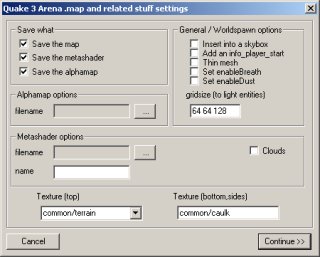
 With EasyGen you build up terrains and export them as Radiant source map
(including alphamap and metahsaders).

 Bitmap import/export is also supported.

 Supported games:
 - Quake3
 - Return To Castle Wolfenstein
 - generally all games based on Quake3 engine, who need a source map(.map), an
   alphamap(.pcx) and a metashader script(.shader) to compile a terrain entity.
   (if you want to to learn more about this process read the Official Terrain
   Manual written by Paul Jaquays contained in the latest GTK installations)

--------------------------------------------------------------------------------
1. Installation
--------------------------------------------------------------------------------
 Make sure to extract all files contained in the zip in the same folder.

 After you've extracted the zip, EasyGen folder should looks something like
this:

 EasyGen\modifiers\*.*			- modifiers
 EasyGen\templates\*.*			- various files (*.shader, *.cfg)
 EasyGen\save\				- saved terrains (*.egn)
 EasyGen\tutorial\*.*			- tutorial stuff (old but sufficient)
 EasyGen\EasyGen.exe			- executable
 EasyGen\btnexgenipl32.dll		- a dll
 EasyGen\readme.txt			- this readme.txt

 EasyGen will not run if 'btnexgenipl32.dll' is not in the same folder.

 Also EasyGen needs to know your work mod folder under <your_game> root folder
(ie baseq3\, missionpack\, main\ etc etc), you will be prompted to browse for
that asa you start EasyGen. I repeat for the last time, you need to browse for
a MOD folder, not for the <your_game> root folder.

--------------------------------------------------------------------------------
2. Features
--------------------------------------------------------------------------------
- Terrain shape manipulation through several modifiers (Hill,Cone etc etc).
- Program your own modifiers with an easy asm like language. Read
  'custom_modifier.txt' to learn more.
- Direct export source map plus alphamap and metashader script.
- Alphamap import/export.
- Bitmap import/export.
- Models (md3) are loaded automatically from <your_game>/<your_mod>/models/
  directory.
- Import brushes from a map file. Brushes are only used as space references to
  aid positiong the terrain entity. Bruhses manipulation is not supported by
  EasyGen and BRUSHES are NOT exported toghether with the terrain. Only the
  TERRAIN ENTITY itself is exported and the models you have inserted.
  Issues:
  * Curved patches are not imported.
  * Texturing is not supported for imported brushes, they will only appear as
  flat shaded polygons.
- Terrain import from a map file (and related alphamap and metashader). This
  should work in the most of the cases.
  Issue:
  * tcmod scale is ignored

- To exclude triangles from export:
  - select MODIFIER TAB.
  - click the pink triangle button on the toolbar (the one with the red cross)
  - SHIFT+LEFTCLK on a triangle

- Upgrading shader templates (templates/*.*) is useful if the author of the
  compiler (ydnar) makes come modifications to the compiler itself (q3map2.exe).
  Replacing old templates with the new ones will ensure that EasyGen will export
  shaders that will work with the new version of the compiler.
--------------------------------------------------------------------------------
3. Known Bugs
--------------------------------------------------------------------------------
 - Resizing the width(x|y) of the grid when lock is OFF does not resize the
   alphamap. (altering divisions does it).
 - I don't know what could happen if you use textures of different sizes, if you
   don't want get in troubles use textures of all the same sizes (all 256x256 or
   all 128x128, ...)
 - I think you'll find other bugs, please let me know :)

--------------------------------------------------------------------------------
4. Credits
--------------------------------------------------------------------------------
 Tnx to:
 .idSoftware for the game
 .NeHe for his OpenGL tutorials - http://nehe.gamedev.net/
 .http://www.codeguru.com/ for his kick ass programming forum
 .guys of http://www.quake3world.com/ level editing forum
 .Binary Technologies for his powerfull image library
	Binary Technologies
	http://www.binary-technologies.de
	[email protected]
 Following people helped me improving the program (in a.o.):
 djbob,Hubas,LordSquart,Kevin,KitCarson,RKone,snickelfritz,ZeroLogic.

--------------------------------------------------------------------------------
5. FAQ & Troubleshooting
--------------------------------------------------------------------------------
Q: What the hell is this gray and white grid?
A: you can get the damned grid for several reasons:
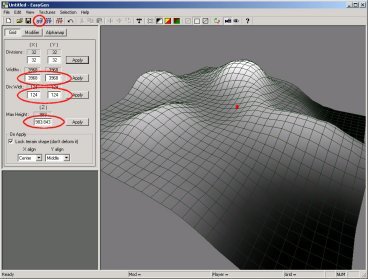
   1. the width of each division along X and/or Y axis is not a power of 2. Use
      128 or 192 or 256(most used). You set these values from the Grid TAB,
      'Div.Width.', enter two values (one along X and other along Y, generally
      the same), then press Apply on the right.
   2. You have played with the keys of the terrain entity from Radiant, or
      renamed and/or edited the alphamap and shader files generated by EasyGen.
      To do this you ust know exactly what are you doing because there are
      linked references by names in that stuff. (filename and names inside text
      files)
   3. Corrupted shaders? Try moving out custom pk3 from you mod folder.
   4. Use unique names. One time I named my egn save file 'test.egn'. It caused
      to export a test.pcx, a test.shader with a test/terrain shader name. The
      infamous grid appeared. I saved the same terrain as 'nemo_happy_test.egn',
      exported the stuff and no hologrid appeared.

Q: Why do the textures look fine from EasyGen and from Quake3 are all shifted
   along a direction?
A: This seems to be a bug of some q3map versions. To fix this edit your
   alphamap(PCX) exported by EasyGen with a 2D graphic program such as
   PaintShopPro and remove the first vertical line of pixels. If the original
   alphamap was 33x33 the final one must 32x33. Sounds strange but it works.

--------------------------------------------------------------------------------
6. Final Stuff
--------------------------------------------------------------------------------
 Programming is an hobby for me, so I take no responsability if your pc blows up
while running EasyGen !

 Feedback, bugs report, suggestions, are appreciated :P

 Quake3Arena and RTCW are registered trademark of 'id Software' !
> http://www.quake3arena.com
> http://www.idsoftware.com
Virus Scan
Clean — No threats detected
Scanned with ClamAV
File Contents
39 files
0.8 MB uncompressed
.mdf (10)
.txt (7)
.shader (6)
.jpg (5)
.htm (2)
.dll (1)
.exe (1)
.css (1)
| File | Size |
|---|---|
| btnexgenipl32.dll | 347K |
| EasyGen.exe | 340K |
| modifiers/ | |
| modifiers/asm-mdf.txt | 2K |
| modifiers/compiler_log.txt | |
| modifiers/Cone.mdf | 1K |
| modifiers/Custom.mdf | 768B |
| modifiers/custom_modifier.txt | 5K |
| modifiers/Hill.mdf | 1K |
| modifiers/Level (circle).mdf | 719B |
| modifiers/Level (diamond).mdf | 846B |
| modifiers/Level (square).mdf | 719B |
| modifiers/Noise.mdf | 922B |
| modifiers/Scale.mdf | 745B |
| modifiers/Smooth Saturation.mdf | 1K |
| modifiers/Sphere.mdf | 1K |
| news.txt | 228B |
| readme.txt | 7K |
| save/ | |
| templates/ | |
| templates/q3map2_blend.shader | 631B |
| templates/q3map2_noblend.shader | 524B |
| templates/q3map2_vertexremap.shader | 294B |
| templates/readme.txt | 2K |
| templates/standard_blend.shader | 429B |
| templates/standard_noblend.shader | 256B |
| templates/standard_vertexremap.shader | 193B |
| templates/templatelist.txt | 124B |
| tutorial/ | |
| tutorial/css/ | |
| tutorial/css/main.css | 523B |
| tutorial/images/ | |
| tutorial/images/Image1.jpg | 23K |
| tutorial/images/Image2.jpg | 21K |
| tutorial/images/Image3.jpg | 24K |
| tutorial/images/Image4.jpg | 29K |
| tutorial/images/Image5.jpg | 21K |
| tutorial/tutorial_eng.htm | 6K |
| tutorial/tutorial_it.htm | 7K |
Comments (0)
Login um einen Kommentar zu schreiben.
File info
Rating
0.0
/5
0 Ratings
Detailed Rating
Design
0.0/5 (0)
Gameplay
0.0/5 (0)
Textures
0.0/5 (0)
Performance
0.0/5 (0)
Originality
0.0/5 (0)
